Where your customers spend their time
Pick the last small business you bought from online. Trace the URLs a customer touches from "I want to buy this" to "thanks for ordering."
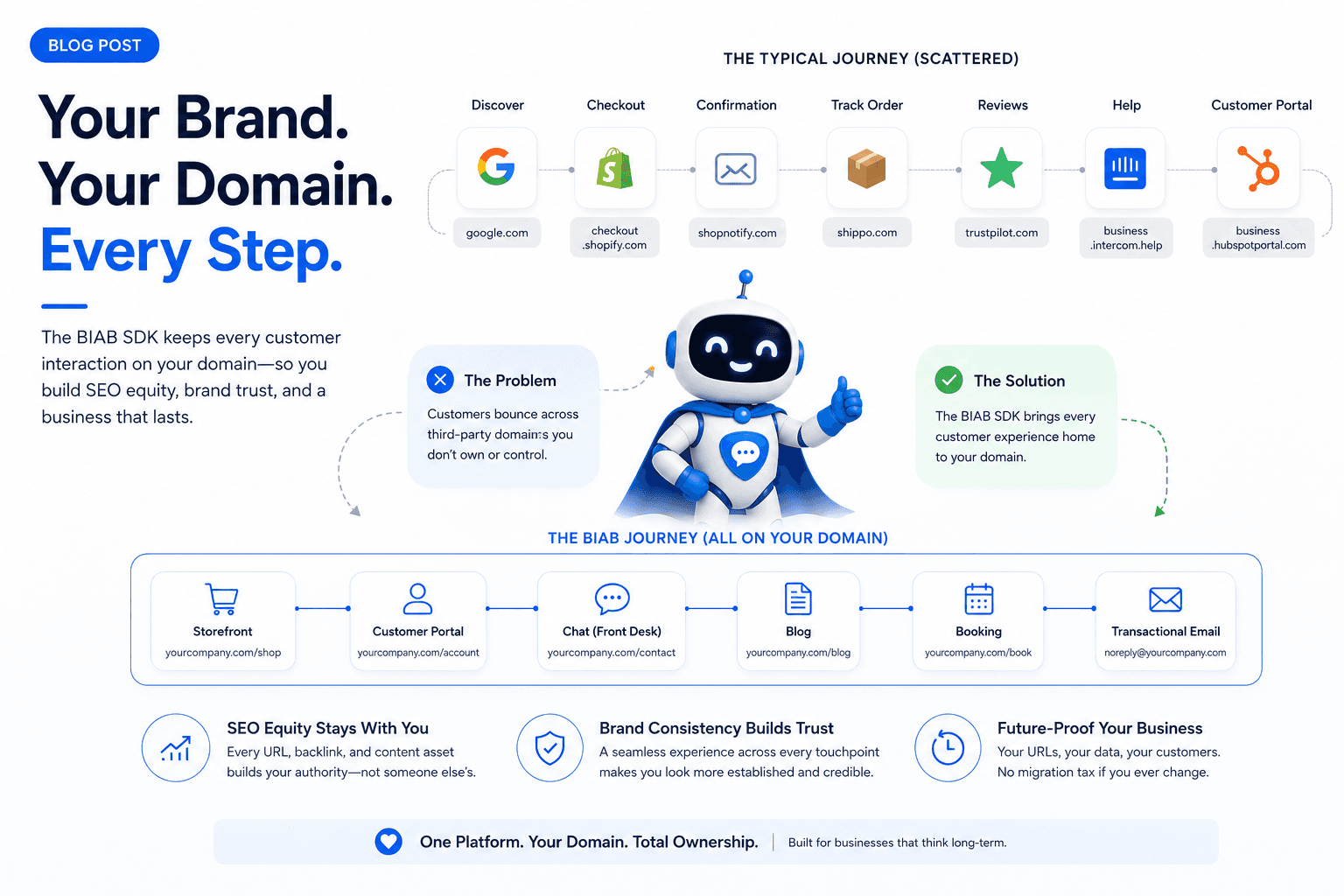
A Google result lands them on the business's domain. Checkout happens at a .shopify.com URL. The order confirmation comes from no-reply@shopnotify.com. The order-status page on the org's site pulls half its data from a Shopify API. The "track shipment" link opens a Shippo page. A few days later, a "leave a review" prompt loads a Trustpilot widget. A help article lives at business.intercom.help. And the customer portal signs them in at business.hubspotportal.com, styled to the brand but hosted somewhere else.
That's a normal Tuesday for an online business. The order shipped. Customers don't usually notice.
But look at the trail again. The customer spent two URLs on the business's actual domain. Every other interaction — the chat widget, the help docs, the order tracking, the review prompt, the portal — happened on someone else's URL bar.
What the SDK does about it
The Business Dash SDK exposes every customer-facing feature as a typed programmatic API. Your site fetches the data; your site renders the UI; your domain owns the URL.
A customer journey on Business Dash looks like this:
Storefront at
yourcompany.com/shop— Stripe Connect underneath; the URL and the design are yoursCustomer portal at
yourcompany.com/account— order history, quotes, invoices, job activity, all fetched via the SDKChat at
yourcompany.com/contact— your design, your placement; Business Dash handles the conversation, AI, and human handoffBlog at
yourcompany.com/blog— markdown, comments, paywalls, rendered natively by your siteBooking at
yourcompany.com/book— availability via the SDKTransactional email from
noreply@yourcompany.com— your verified domain
The customer never sees a Business Dash URL. They don't know which platform is underneath. To them, you're a company that built the best end-to-end user experience, and to your staff, your entire company has automation and infrastructure typically only build after decades of work.
What changes on a one-year horizon
Three things start to compound, slowly at first, then visibly.
SEO equity stays with you. Every URL is your URL. Google Search Console, your sitemap, your structured data, your backlink graph — all on your domain. After a year of content, you're the one accumulating backlinks, not the platform.
Brand consistency tightens. No third-party widget aesthetic competing with your design. The chat panel matches your buttons. The customer portal matches your typography. The order-confirmation email looks like every other email you send. Over months, that consistency reads as "established business" — especially in trades where customer trust is the buying signal.
The migration tax disappears. If you ever switch off Business Dash, the URLs your customers know are still your URLs. Their bookmarks still work. Whatever data layer you switch to renders against the same paths.
What's underneath the SDK
Behind the data layer, Business Dash ships the full operations stack: CRM with custom fields, storefront + checkout, dispatch + live map, POS at the truck, quote → contract → invoice flows, Front Desk chat, workflows for any business model, vendor portal, AI agents, email + SMS campaigns, reviews, forms, blog with paywalls, refund policies, full shipping integration, address validation, and notification preferences.
Same combined-bill economics as the all-in-one platforms. The difference is everything customer-facing renders on your domain through the SDK.
The world this builds
Your customer-facing surface stays on your domain, from the storefront through the portal through the email. Your SEO equity lands on your URL instead of splitting across five subdomains. And your customers' bookmarks keep working when you outgrow a vendor.
That's the world the SDK builds for you. It's the architectural trade we wanted to make for ourselves when we were running businesses on stacks of twelve tools.
